Schedulers
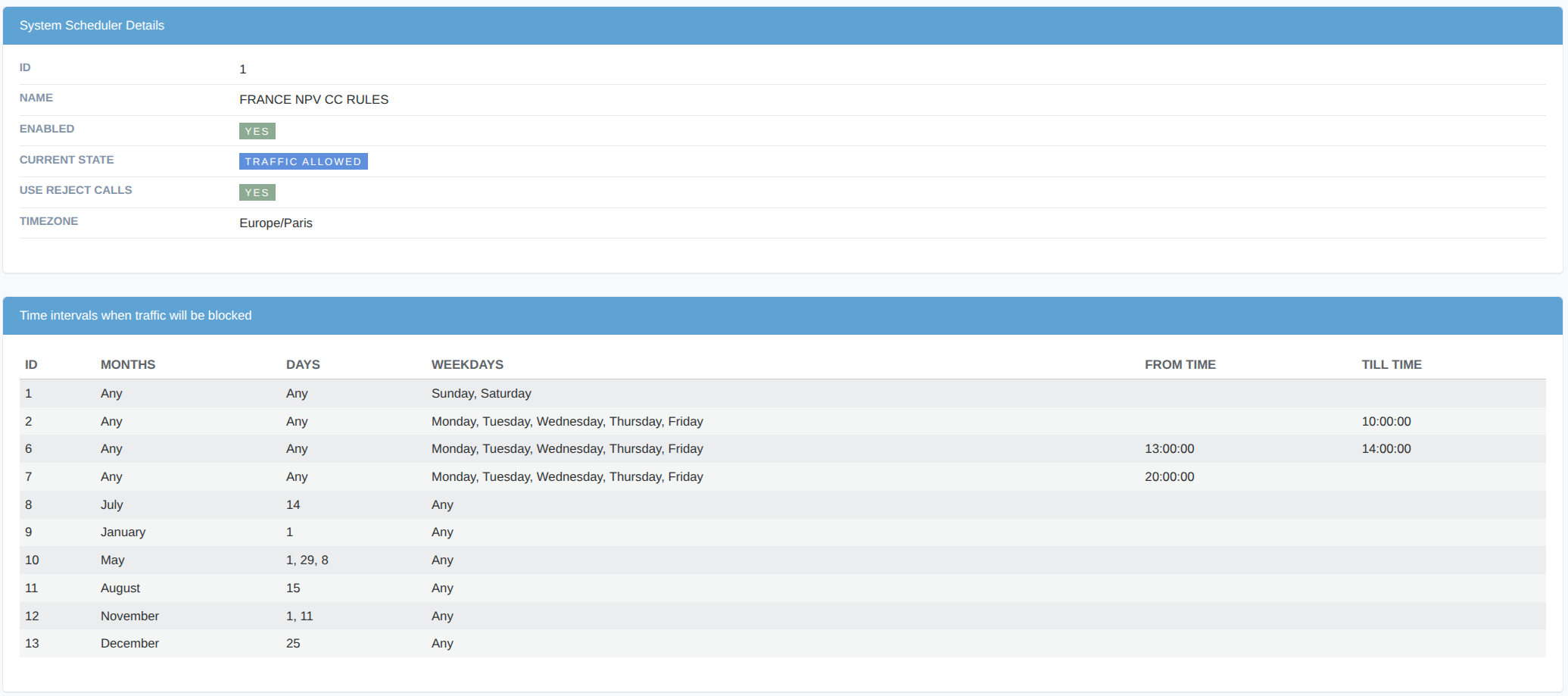
Schedulers provide an automatic mechanism to enable, disable, and toggle the Reject Calls flag in Customer Auth, Destination, Dialpeer, and Gateway objects.
Scheduler Fields
- Id
Unique scheduler identifier.
- Name
User-friendly scheduler name.
- Enabled
Only enabled schedulers are processed by the system.
- Use Reject Calls
Controls how the scheduler blocks traffic when a configured time range is active:
- Enabled — the target object stays enabled, but its
Reject callsflag is set totrue. Calls are actively rejected with the configured reject code. - Disabled — the target object is fully disabled (
enabled = false). It is excluded from authentication and routing as if it does not exist.
When no time range is currently active, the object is automatically re-enabled and
Reject callsis reset tofalse.- Enabled — the target object stays enabled, but its
- Current State
The current operational state of the scheduler. The system automatically recalculates this state every 2 minutes.
- Timezone
The timezone that determines when the scheduler operates.
Ranges Configuration
By default, a scheduler allows all traffic. To define when traffic should be blocked, create one or more ranges. Range Attributes:
- Months
- Months during which blocking will be applied. An empty value means any month.
- Days
- Days of the month when blocking will be applied. An empty value means any day of the month.
- Weekdays
- Days of the week when blocking will be applied. An empty value means any day of the week.
- From Time
- Start time of the blocking period. An empty value means start of the day.
- Till Time
- End time of the blocking period. An empty value means end of the day.