Accounts
Accounts are used for describing separate billing account of some Contractor. Contractor could have more than one Account.
It is necessary to configure Contractor before creating Account. Initial balance for newly created account is always zero. Balance can be changed as result of calls billing or new Payments.
For each call: account balance will be decreased on call cost if it uses account for origination (customer) and increased if it uses account for termination (vendor).
Properties
- Id
- Auto-generated unique account id.
- UUID
- Auto-generated unique account UUID. UUID used as identifier for Customer API
- EXTERNAL
- external_id account attribute value. external_id stores ID from external system when data provisioned via Admin API
- Name
- Unique account name.
- Contractor
- Contractor that is related to this Account.
- Currency
- Currency used for this account's balance, rates, and invoice amounts. Set at account creation and cannot be changed afterwards.
- Balance
- Current account balance.
- Min balance
- If account balance become less than this limit, then traffic for this account will be blocked.
- Max balance
- If account balance become greater than this limit, then routes, which are belongs to this account, will not be used for calls termination.
- VAT
- Account VAT value. Affects calculation of customer_price in CDR.
- Destination rate limit
- Maximum per-minute price allowed
- Max call duration
- Maximum call duration in seconds for calls originated by or terminated to this account. When set, this value overrides the global maximum call duration configured in system settings. If not set, the global value is used as a fallback.
- Origination capacity
- Maximum capacity which can be originated for this account. If incoming calls number exceed origination capacity, then traffic will be blocked.
- Termination capacity
- Maximum capacity which can be terminated for this account. If outgoing calls number exceed origination capacity, then routes, which are belongs to this account, will not be used for new calls.
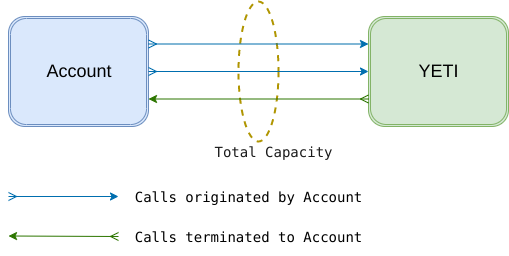
- Total capacity
- Shared capacity either for incoming or outgoing calls, i.e. summarized traffic in both directions (but not in particular one) is limited by this number (see the picture below).
- Invoice period
- Automatic invoices generation period. When empty, invoices are not generated automatically for this account. See Invoice periods below.
- Invoice template
- Template for generation of PDF invoice documents. Templates can be configured at Billing->Invoice templates
- Send invoices to
- List of Contacts where to send invoices
- Invoice Ref template
- Invoice reference generation template. Use $id as unique value per account.
- Timezone
- Timezone which will be used for invoices generation for this account.
Invoice periods
If Invoice period is set for an account, the system automatically generates Invoices for this account. Every period is a continuous time range: the end of one period is exactly the start of the next one, so periods never overlap and never leave gaps.
All period boundaries are calculated as midnight in the account's Timezone, not in the server timezone. Changing the account Timezone re-aligns the upcoming period boundary to the new timezone.
The following periods are available:
- Daily
- Period is one calendar day. Each period starts at 00:00 and ends at 00:00 of the next day.
- Weekly
- Period is one calendar week, aligned to ISO weeks: it starts on Monday 00:00 and ends on the next Monday 00:00.
- BiWeekly
- Period is two calendar weeks. Periods are aligned to ISO week numbers so that every period ends at the beginning of an even ISO week, i.e. boundaries are fixed by the calendar and do not depend on the date when the account was configured.
- Monthly
- Period is one calendar month. Each period starts on the 1st day of the month at 00:00 and ends on the 1st day of the next month at 00:00.
- SemiMonthly
- Month is billed by two periods: from the 1st day of the month at 00:00 to the 16th day at 00:00, and from the 16th day at 00:00 to the 1st day of the next month at 00:00. Period length therefore varies from 13 to 16 days depending on the month.
- Weekly. Split by new month
- The same as Weekly, but a week that crosses a month boundary is split into two periods. For example, the week from Monday, 29 of January is billed as two invoices: 29 of January - 1 of February, and 1 of February - 5 of February.
- BiWeekly. Split by new month
- The same as BiWeekly, but a two-week period that crosses a month boundary is split into two periods at the 1st day of the new month, in the same way as Weekly. Split by new month.
Full and partial invoices
Invoices generated for a complete period have Type Auto. Invoices generated for a period that was shortened by a month boundary have Type Auto partial. Only the two Split by new month periods can produce Auto partial invoices; all other periods always produce Auto invoices. See Invoices for the full list of invoice attributes.
When invoices are generated
Invoice generation is performed by a scheduled job that runs once a day. An account is processed only when its period has already ended and additionally the Max call duration interval has passed since the period end (the global maximum call duration is used when the account value is not set). This delay guarantees that calls which were still in progress at the moment of the period end are already written to CDRs and therefore are billed in the correct invoice.
If Auto approve is enabled in the system invoice settings, generated invoices are approved automatically, which also triggers sending them to the contacts listed in Send invoices to and generation of PDF documents when Invoice template is set.
Balance notification settings
- Balance low threshold
- If account balance become less than this limit, notification will be send by email.
- Balance high threshold
- If account balance become greater than this limit, notification will be send by email.
- Send balance notifications to
- List of Contacts where to send balance notification emails
The subject and HTML body of these emails are defined by the Notification templates.
Quick Filters
Account page (Billing->Accounts menu) provides few quick filters:
- Vendors Accounts
- Displays only accounts linked to contractors with flag
Vendorenabled - Customers Accounts
- Displays only accounts linked to contractors with flag
Customerenabled - Insufficient Balance
- Displays accounts where
balance<min_balanceORbalance>max_balance - Low Balance Threshold
- Displays accounts where low threshold configured in Balance notification settings and
balance<low_threshold - High Balance Threshold
- Displays accounts where high threshold configured in Balance notification settings and
balance>high_threshold